Workflow vs. Process vs. System
The TL;DR:
- Workflows are the atomic units of business operations—automating them creates precision, while automating entire processes creates bloat.
- The workflow → process → system hierarchy determines whether your automation scales or breaks as you grow.
- Workflow-level thinking reveals bottlenecks, enables customization, and builds automation that adapts instead of requiring constant rebuilds.
The Problem Most Founders Don't See Until It's Too Late
Here's the pattern I see constantly: A founder hits $2M ARR, realizes their team is drowning in repetitive work, and decides to "automate everything." Six months later, they've spent $50K on tools, their team is more confused than before, and every time the business changes, the automation breaks.
The issue isn't the tools. It's that they automated at the wrong level.
They tried to automate entire processes—sales, onboarding, customer service—without understanding the individual workflows that make up those processes. It's like trying to optimize a factory without knowing what each machine does. You end up with expensive chaos.
The companies that scale automation successfully do something different: they think at the workflow level first. This article breaks down why that distinction matters and how it changes everything about building systems that grow with you.
The Diagnosis: Why Process-Level Automation Fails
If you've tried to automate your operations and hit these symptoms, you're not alone:
- Brittle systems that break constantly: Every time you add a product, hire a new person, or change a pricing model, your automation stops working and requires manual intervention.
- Tools that don't talk to each other: You have seven different platforms running seven different "automated processes," but they're not connected, so your team is still copying data between systems.
- Unclear ROI: You can't pinpoint what's actually saving time because you automated big, vague processes instead of specific, measurable tasks.
- Team resistance: Your employees bypass the automation because it's easier to do things manually than to troubleshoot why the system didn't trigger correctly.
The root cause is simple: processes are too high-level to automate effectively. A "sales process" might include 40 different tasks across prospecting, qualification, demo delivery, negotiation, and closing. If you try to automate the entire thing as one unit, you lose visibility into which specific tasks are causing problems, which can be optimized, and which should stay manual.
Workflows are the atomic units. They're individual sequences of tasks—like "send contract after demo is marked complete" or "notify finance when deal closes above $10K." When you automate at this level, you gain precision, flexibility, and control.
The Insight: How Workflows Stack Into Systems
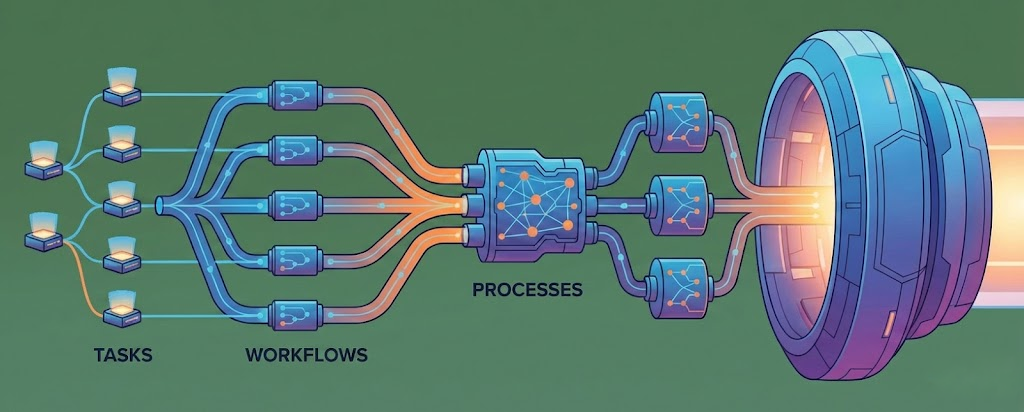
After working with dozens of operations teams, I started noticing a hierarchy that high-performing companies follow instinctively:
Workflows → Processes → Systems.
Here's how it works:
A workflow is a single sequence of tasks. Example: "When lead fills out demo form, assign to rep based on territory, send calendar invite, add to CRM."
A process is a collection of connected workflows. Example: Your sales process includes workflows for lead routing, demo scheduling, proposal generation, contract signing, and onboarding handoff.
A system is the integration of multiple processes working together. Example: Your revenue system integrates sales, customer success, billing, and product usage data to drive expansion.
The companies that scale don't start by trying to build the system. They start by documenting and automating individual workflows. Then they connect those workflows into processes. Finally, they optimize how those processes interact to form a system.
This approach has three massive advantages: clarity, flexibility, and scalability. You can see exactly where things break, fix them without overhauling everything, and add new workflows as your business evolves.
The Framework: Workflow-Level Automation
1. Define Tasks With Precision
The Concept: Before you automate anything, break down your process into the smallest possible tasks. Each task should have a clear trigger, action, and outcome.
The Application:
- Map out every step in your current process, even the ones that seem obvious.
- Identify the trigger for each task (time-based, event-based, manual).
- Specify the exact action and what "done" looks like for that task.
- Document who or what is responsible for each task—human, tool, or both.
2. Sequence Tasks Logically
The Concept: Once tasks are defined, arrange them in the correct order. Sequencing determines dependencies—which tasks must happen before others can begin.
The Application:
- Create a linear flow for simple workflows (A → B → C).
- Build conditional branches for workflows with decision points (If A, then B; if not, then C).
- Identify parallel tasks that can happen simultaneously to reduce cycle time.
- Test the sequence with edge cases to ensure nothing breaks when conditions change.
3. Connect Workflows Into Processes
The Concept: Individual workflows are powerful, but connecting them creates leverage. This is where you move from task automation to process orchestration.
The Application:
- Identify handoff points where one workflow triggers another (e.g., "deal closed" triggers onboarding workflow).
- Use shared data fields to ensure information flows between workflows without manual re-entry.
- Build feedback loops so workflows can inform and improve each other.
- Document the connections so your team understands how workflows interact.
4. Optimize for Scalability
The Concept: Workflow-level automation scales because you can add, remove, or modify individual workflows without breaking the entire system.
The Application:
- Design workflows to handle variable inputs (different deal sizes, customer types, product lines).
- Build error handling into each workflow so failures are contained and visible.
- Create modular workflows that can be reused across different processes.
- Set metrics for each workflow to measure performance and identify optimization opportunities.
Where Founders Go Wrong
Mistake 1: Automating Before Standardizing. You can't automate chaos. If your team does the same task five different ways, automation will just scale the inconsistency. Standardize the workflow first, then automate it.
Mistake 2: Trying to Automate Everything at Once. This leads to overwhelm and failure. Start with one high-volume, low-complexity workflow. Prove the ROI, then expand. I see the best results when founders automate 3-5 workflows in the first 90 days, not 30.
Mistake 3: Ignoring the Human Element. Automation doesn't mean eliminating people—it means freeing them from repetitive work so they can focus on judgment, creativity, and relationships. If your team doesn't understand why you're automating or how it helps them, they'll resist. Bring them into the workflow mapping process early.
Monday Morning Actions
- Pick one repetitive process that's causing pain. Don't start with your most complex process. Choose something your team does 10+ times per week that's purely mechanical—contract generation, lead routing, invoice creation.
- Map the workflow on paper or in a simple tool like Miro or Lucidchart. Write down every single task, the trigger, the action, and who's responsible. Show it to the person who actually does the work and ask, "What am I missing?"
- Identify the one task in that workflow that takes the most time or causes the most errors, and automate just that task. Use a tool like Zapier, Make, or your CRM's native automation. Measure the time saved over the next two weeks, then decide whether to automate the next task.
The Shift: From Firefighting to Compounding
The difference between founders who scale and those who plateau isn't talent or market conditions—it's leverage. Workflow-level automation creates compounding leverage. Each workflow you automate frees up hours every week. Those hours get reinvested into higher-value work, which drives revenue, which funds more automation.
The alternative is trying to automate entire processes all at once, failing, and concluding that "automation doesn't work for our business." It does. You're just operating at the wrong level.
Start with one workflow this week. Map it, standardize it, automate it. Then do it again next week. In six months, you'll have a system that scales. In six months without this approach, you'll have a more expensive version of the same chaos you have today.
Why Automating at the Workflow Level Changes Everything
The TL;DR:
- Workflows are the atomic units of business operations—automating them creates precision, while automating entire processes creates bloat.
- The workflow → process → system hierarchy determines whether your automation scales or breaks as you grow.
- Workflow-level thinking reveals bottlenecks, enables customization, and builds automation that adapts instead of requiring constant rebuilds.
The Problem Most Founders Don't See Until It's Too Late
Here's the pattern I see constantly: A founder hits $2M ARR, realizes their team is drowning in repetitive work, and decides to "automate everything." Six months later, they've spent $50K on tools, their team is more confused than before, and every time the business changes, the automation breaks.
The issue isn't the tools. It's that they automated at the wrong level.
They tried to automate entire processes—sales, onboarding, customer service—without understanding the individual workflows that make up those processes. It's like trying to optimize a factory without knowing what each machine does. You end up with expensive chaos.
The companies that scale automation successfully do something different: they think at the workflow level first. This article breaks down why that distinction matters and how it changes everything about building systems that grow with you.
The Diagnosis: Why Process-Level Automation Fails
If you've tried to automate your operations and hit these symptoms, you're not alone:
- Brittle systems that break constantly: Every time you add a product, hire a new person, or change a pricing model, your automation stops working and requires manual intervention.
- Tools that don't talk to each other: You have seven different platforms running seven different "automated processes," but they're not connected, so your team is still copying data between systems.
- Unclear ROI: You can't pinpoint what's actually saving time because you automated big, vague processes instead of specific, measurable tasks.
- Team resistance: Your employees bypass the automation because it's easier to do things manually than to troubleshoot why the system didn't trigger correctly.
The root cause is simple: processes are too high-level to automate effectively. A "sales process" might include 40 different tasks across prospecting, qualification, demo delivery, negotiation, and closing. If you try to automate the entire thing as one unit, you lose visibility into which specific tasks are causing problems, which can be optimized, and which should stay manual.
Workflows are the atomic units. They're individual sequences of tasks—like "send contract after demo is marked complete" or "notify finance when deal closes above $10K." When you automate at this level, you gain precision, flexibility, and control.
The Insight: How Workflows Stack Into Systems
After working with dozens of operations teams, I started noticing a hierarchy that high-performing companies follow instinctively:
Workflows → Processes → Systems.
Here's how it works:
A workflow is a single sequence of tasks. Example: "When lead fills out demo form, assign to rep based on territory, send calendar invite, add to CRM."
A process is a collection of connected workflows. Example: Your sales process includes workflows for lead routing, demo scheduling, proposal generation, contract signing, and onboarding handoff.
A system is the integration of multiple processes working together. Example: Your revenue system integrates sales, customer success, billing, and product usage data to drive expansion.
The companies that scale don't start by trying to build the system. They start by documenting and automating individual workflows. Then they connect those workflows into processes. Finally, they optimize how those processes interact to form a system.
This approach has three massive advantages: clarity, flexibility, and scalability. You can see exactly where things break, fix them without overhauling everything, and add new workflows as your business evolves.
The Framework: Workflow-Level Automation
1. Define Tasks With Precision
The Concept: Before you automate anything, break down your process into the smallest possible tasks. Each task should have a clear trigger, action, and outcome.
The Application:
- Map out every step in your current process, even the ones that seem obvious.
- Identify the trigger for each task (time-based, event-based, manual).
- Specify the exact action and what "done" looks like for that task.
- Document who or what is responsible for each task—human, tool, or both.
2. Sequence Tasks Logically
The Concept: Once tasks are defined, arrange them in the correct order. Sequencing determines dependencies—which tasks must happen before others can begin.
The Application:
- Create a linear flow for simple workflows (A → B → C).
- Build conditional branches for workflows with decision points (If A, then B; if not, then C).
- Identify parallel tasks that can happen simultaneously to reduce cycle time.
- Test the sequence with edge cases to ensure nothing breaks when conditions change.
3. Connect Workflows Into Processes
The Concept: Individual workflows are powerful, but connecting them creates leverage. This is where you move from task automation to process orchestration.
The Application:
- Identify handoff points where one workflow triggers another (e.g., "deal closed" triggers onboarding workflow).
- Use shared data fields to ensure information flows between workflows without manual re-entry.
- Build feedback loops so workflows can inform and improve each other.
- Document the connections so your team understands how workflows interact.
4. Optimize for Scalability
The Concept: Workflow-level automation scales because you can add, remove, or modify individual workflows without breaking the entire system.
The Application:
- Design workflows to handle variable inputs (different deal sizes, customer types, product lines).
- Build error handling into each workflow so failures are contained and visible.
- Create modular workflows that can be reused across different processes.
- Set metrics for each workflow to measure performance and identify optimization opportunities.
Where Founders Go Wrong
Mistake 1: Automating Before Standardizing. You can't automate chaos. If your team does the same task five different ways, automation will just scale the inconsistency. Standardize the workflow first, then automate it.
Mistake 2: Trying to Automate Everything at Once. This leads to overwhelm and failure. Start with one high-volume, low-complexity workflow. Prove the ROI, then expand. I see the best results when founders automate 3-5 workflows in the first 90 days, not 30.
Mistake 3: Ignoring the Human Element. Automation doesn't mean eliminating people—it means freeing them from repetitive work so they can focus on judgment, creativity, and relationships. If your team doesn't understand why you're automating or how it helps them, they'll resist. Bring them into the workflow mapping process early.
Monday Morning Actions
- Pick one repetitive process that's causing pain. Don't start with your most complex process. Choose something your team does 10+ times per week that's purely mechanical—contract generation, lead routing, invoice creation.
- Map the workflow on paper or in a simple tool like Miro or Lucidchart. Write down every single task, the trigger, the action, and who's responsible. Show it to the person who actually does the work and ask, "What am I missing?"
- Identify the one task in that workflow that takes the most time or causes the most errors, and automate just that task. Use a tool like Zapier, Make, or your CRM's native automation. Measure the time saved over the next two weeks, then decide whether to automate the next task.
The Shift: From Firefighting to Compounding
The difference between founders who scale and those who plateau isn't talent or market conditions—it's leverage. Workflow-level automation creates compounding leverage. Each workflow you automate frees up hours every week. Those hours get reinvested into higher-value work, which drives revenue, which funds more automation.
The alternative is trying to automate entire processes all at once, failing, and concluding that "automation doesn't work for our business." It does. You're just operating at the wrong level.
Start with one workflow this week. Map it, standardize it, automate it. Then do it again next week. In six months, you'll have a system that scales. In six months without this approach, you'll have a more expensive version of the same chaos you have today.