How to Automate Sales Follow-Ups Using RAG-Powered AI Agents
The TL;DR:
- Sales teams waste hours searching internal content libraries to send relevant resources to prospects—AI agents can do this in seconds
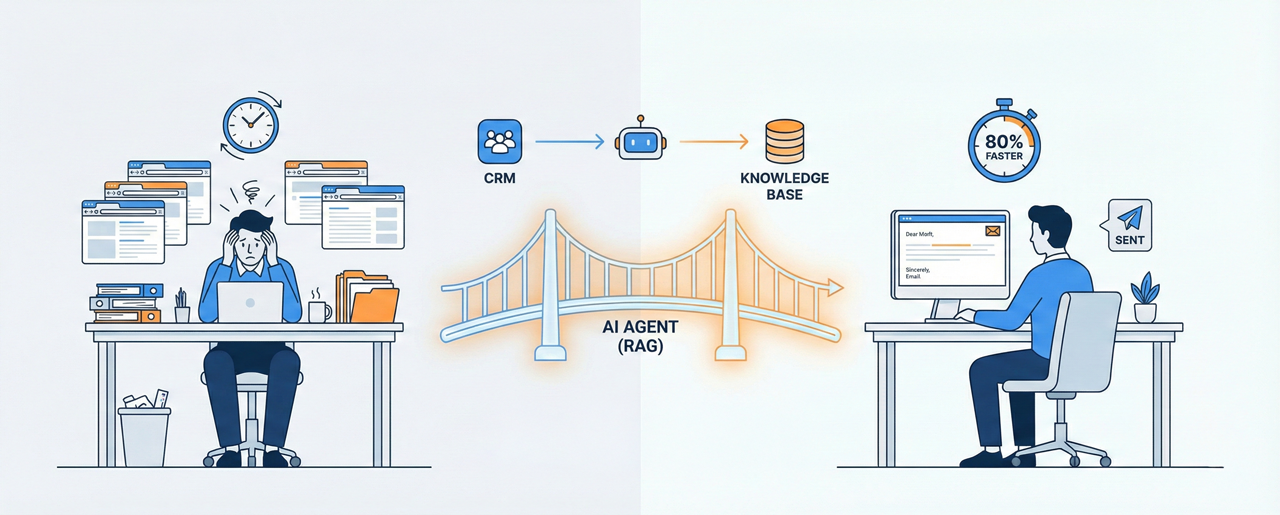
- A simple RAG (Retrieval-Augmented Generation) setup connects your CRM conversations to your knowledge base, pulling context-specific recommendations automatically
- This isn't theoretical—founders are using this daily to cut follow-up time by 80% while increasing response personalization
The Problem: Your Best Content Is Buried
Here's the pattern I see constantly: You close a discovery call. The prospect mentions they're struggling with customer onboarding. You know you have a podcast episode about that. Maybe a case study. Definitely a blog post somewhere.
So you open five browser tabs. You search Notion. You scroll through your podcast library. You ping Slack asking if anyone remembers which episode covered onboarding automation.
Fifteen minutes later, you've found two semi-relevant resources. You copy-paste them into an email with a generic "thought you'd find these helpful" message. The prospect never opens it.
The real cost isn't the 15 minutes. It's that you sent mediocre follow-up because finding the perfect resources wasn't worth 45 minutes of manual search. Your close rate suffers because your follow-up game is limited by human memory and search functionality built in 2015.
Why This Happens: The Knowledge Base Gap
Most sales teams operate with a fatal disconnect:
- Your best conversion content exists (podcasts, case studies, demo videos, comparison guides)
- Your CRM knows exactly what each prospect cares about (their pain points, industry, objections)
- But these two systems don't talk to each other—so you're the slow, unreliable API between them
The old way was hiring a sales ops person to tag everything and build content matrices. The new way is letting an AI agent do semantic search across your entire knowledge base in real-time, understanding context rather than just matching keywords.
The Shift: RAG-Powered Sales Agents
After watching hundreds of founders manually dig through content libraries, I built a system that does this automatically. It takes about 30 minutes to set up, costs roughly $0.02 per query, and I use it every single day.
Here's what happened: A prospect replied saying they were interested in automating their lead qualification process. Instead of spending 20 minutes hunting for relevant content, I dropped their message into the agent. In 18 seconds, it returned three podcast episodes that directly addressed their use case, explained why each was relevant, and suggested next steps for the conversation.
The prospect booked a demo the same day. The follow-up felt custom-built because it was—just not by me manually.
The Framework: Build Your Sales Co-Pilot in 4 Steps
Step 1: Set Up the Chat Trigger
What it is: The entry point where you'll paste prospect messages or questions.
How to do it:
- Use any no-code automation platform that supports AI agents (Make, Zapier, n8n, or a custom Slack bot)
- Create a simple chat interface—this can be as basic as a Slack channel or a dedicated chat window
- The only requirement: it needs to accept text input and pass it to your AI agent
Step 2: Connect Your Knowledge Bases
What it is: The databases or vector stores that hold your content (the "Retrieval" part of RAG).
How to do it:
- Identify your high-value content repositories (podcast transcripts, case studies, product docs, previous email templates)
- Use a vector database like Pinecone, Weaviate, or even Airtable with embeddings
- Connect at least two databases: one for content (what you send prospects) and one for use cases (how clients actually use your product)
- The agent will query these in real-time based on the prospect's message
Step 3: Write Your System Prompt
What it is: The instruction set that tells the AI agent how to behave, what to prioritize, and how to format responses.
How to do it:
- Define the agent's role (e.g., "You are a sales assistant who finds the most relevant content for prospect follow-ups")
- Specify output format (e.g., "Return exactly 3 resources with title, relevance explanation, and suggested next step")
- Include quality filters (e.g., "Only recommend content published in the last 12 months" or "Prioritize case studies from the same industry")
- Add conversational boundaries (e.g., "If the request is unclear, ask one clarifying question before searching")
Step 4: Choose Your Model and Add Memory
What it is: The AI model that processes requests and the memory layer that maintains context across multiple queries.
How to do it:
- Use a modern LLM: Claude Sonnet 3.5, Gemini 2.0 Flash, or GPT-4o
- Enable simple memory or conversation history so the agent can refine results if your first query wasn't specific enough
- Test with 5-10 real prospect messages to calibrate prompt and database connections
Where Founders Go Wrong
Trap 1: Trying to automate the entire email send. Don't let the agent send emails directly to prospects—at least not at first. Use it to draft follow-ups that you review and personalize. The goal is 80% time savings, not 100% automation that feels robotic.
Trap 2: Feeding it garbage data. If your knowledge base is full of outdated content, duplicate case studies, or vague product docs, the agent will surface garbage. Spend 2 hours cleaning your top 20 most-used resources before connecting them. Quality over quantity.
Trap 3: Over-engineering the prompt. I see founders writing 1,200-word system prompts with 37 conditional rules. Start simple: "Find 3 relevant podcast episodes and explain why each matters." You can add complexity once you see what breaks.
Monday Morning Actions
- Audit your content library. Open a spreadsheet and list every high-value asset you currently send to prospects (podcasts, case studies, demos, guides). Tag each with 3-5 keywords representing the problems they solve. This takes 30 minutes and becomes your initial knowledge base.
- Set up a basic chat interface. If you use Slack, create a private channel and connect it to Zapier or Make.com with a webhook. If you don't have automation tools yet, start with a shared Google Doc where you paste prospect messages and agent responses. The interface doesn't matter—the workflow does.
- Test with your last 5 prospect conversations. Go into your CRM, grab the last 5 messages from active prospects, and manually search for what content you should have sent them. Time yourself. This is your baseline. Once you build the agent, run the same test and compare speed + relevance.
The Before and After
Before: Sales follow-up was a memory test. Your close rate depended on how well you remembered which podcast covered which topic, or whether you could find that one case study from Q3.
After: Every prospect gets a follow-up that feels hand-picked, because it is—by an agent that has perfect recall of your entire content library and understands semantic relevance, not just keyword matching.
This isn't about replacing salespeople. It's about giving them a co-pilot that eliminates the low-value search work so they can focus on the high-value relationship work.
Automate your sales follow-ups!
The TL;DR:
- Sales teams waste hours searching internal content libraries to send relevant resources to prospects—AI agents can do this in seconds
- A simple RAG (Retrieval-Augmented Generation) setup connects your CRM conversations to your knowledge base, pulling context-specific recommendations automatically
- This isn't theoretical—founders are using this daily to cut follow-up time by 80% while increasing response personalization
The Problem: Your Best Content Is Buried
Here's the pattern I see constantly: You close a discovery call. The prospect mentions they're struggling with customer onboarding. You know you have a podcast episode about that. Maybe a case study. Definitely a blog post somewhere.
So you open five browser tabs. You search Notion. You scroll through your podcast library. You ping Slack asking if anyone remembers which episode covered onboarding automation.
Fifteen minutes later, you've found two semi-relevant resources. You copy-paste them into an email with a generic "thought you'd find these helpful" message. The prospect never opens it.
The real cost isn't the 15 minutes. It's that you sent mediocre follow-up because finding the perfect resources wasn't worth 45 minutes of manual search. Your close rate suffers because your follow-up game is limited by human memory and search functionality built in 2015.
Why This Happens: The Knowledge Base Gap
Most sales teams operate with a fatal disconnect:
- Your best conversion content exists (podcasts, case studies, demo videos, comparison guides)
- Your CRM knows exactly what each prospect cares about (their pain points, industry, objections)
- But these two systems don't talk to each other—so you're the slow, unreliable API between them
The old way was hiring a sales ops person to tag everything and build content matrices. The new way is letting an AI agent do semantic search across your entire knowledge base in real-time, understanding context rather than just matching keywords.
The Shift: RAG-Powered Sales Agents
After watching hundreds of founders manually dig through content libraries, I built a system that does this automatically. It takes about 30 minutes to set up, costs roughly $0.02 per query, and I use it every single day.
Here's what happened: A prospect replied saying they were interested in automating their lead qualification process. Instead of spending 20 minutes hunting for relevant content, I dropped their message into the agent. In 18 seconds, it returned three podcast episodes that directly addressed their use case, explained why each was relevant, and suggested next steps for the conversation.
The prospect booked a demo the same day. The follow-up felt custom-built because it was—just not by me manually.
The Framework: Build Your Sales Co-Pilot in 4 Steps
Step 1: Set Up the Chat Trigger
What it is: The entry point where you'll paste prospect messages or questions.
How to do it:
- Use any no-code automation platform that supports AI agents (Make, Zapier, n8n, or a custom Slack bot)
- Create a simple chat interface—this can be as basic as a Slack channel or a dedicated chat window
- The only requirement: it needs to accept text input and pass it to your AI agent
Step 2: Connect Your Knowledge Bases
What it is: The databases or vector stores that hold your content (the "Retrieval" part of RAG).
How to do it:
- Identify your high-value content repositories (podcast transcripts, case studies, product docs, previous email templates)
- Use a vector database like Pinecone, Weaviate, or even Airtable with embeddings
- Connect at least two databases: one for content (what you send prospects) and one for use cases (how clients actually use your product)
- The agent will query these in real-time based on the prospect's message
Step 3: Write Your System Prompt
What it is: The instruction set that tells the AI agent how to behave, what to prioritize, and how to format responses.
How to do it:
- Define the agent's role (e.g., "You are a sales assistant who finds the most relevant content for prospect follow-ups")
- Specify output format (e.g., "Return exactly 3 resources with title, relevance explanation, and suggested next step")
- Include quality filters (e.g., "Only recommend content published in the last 12 months" or "Prioritize case studies from the same industry")
- Add conversational boundaries (e.g., "If the request is unclear, ask one clarifying question before searching")
Step 4: Choose Your Model and Add Memory
What it is: The AI model that processes requests and the memory layer that maintains context across multiple queries.
How to do it:
- Use a modern LLM: Claude Sonnet 3.5, Gemini 2.0 Flash, or GPT-4o
- Enable simple memory or conversation history so the agent can refine results if your first query wasn't specific enough
- Test with 5-10 real prospect messages to calibrate prompt and database connections
Where Founders Go Wrong
Trap 1: Trying to automate the entire email send. Don't let the agent send emails directly to prospects—at least not at first. Use it to draft follow-ups that you review and personalize. The goal is 80% time savings, not 100% automation that feels robotic.
Trap 2: Feeding it garbage data. If your knowledge base is full of outdated content, duplicate case studies, or vague product docs, the agent will surface garbage. Spend 2 hours cleaning your top 20 most-used resources before connecting them. Quality over quantity.
Trap 3: Over-engineering the prompt. I see founders writing 1,200-word system prompts with 37 conditional rules. Start simple: "Find 3 relevant podcast episodes and explain why each matters." You can add complexity once you see what breaks.
Monday Morning Actions
- Audit your content library. Open a spreadsheet and list every high-value asset you currently send to prospects (podcasts, case studies, demos, guides). Tag each with 3-5 keywords representing the problems they solve. This takes 30 minutes and becomes your initial knowledge base.
- Set up a basic chat interface. If you use Slack, create a private channel and connect it to Zapier or Make.com with a webhook. If you don't have automation tools yet, start with a shared Google Doc where you paste prospect messages and agent responses. The interface doesn't matter—the workflow does.
- Test with your last 5 prospect conversations. Go into your CRM, grab the last 5 messages from active prospects, and manually search for what content you should have sent them. Time yourself. This is your baseline. Once you build the agent, run the same test and compare speed + relevance.
The Before and After
Before: Sales follow-up was a memory test. Your close rate depended on how well you remembered which podcast covered which topic, or whether you could find that one case study from Q3.
After: Every prospect gets a follow-up that feels hand-picked, because it is—by an agent that has perfect recall of your entire content library and understands semantic relevance, not just keyword matching.
This isn't about replacing salespeople. It's about giving them a co-pilot that eliminates the low-value search work so they can focus on the high-value relationship work.